Power Out Alert Model PS-110
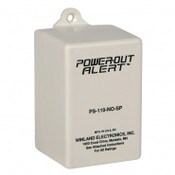
Plugs into any 110VAC receptacle outlet, if the outlet experiences power loss for > 3-8 minutes the "Power Out Alert" built-in contacts will close. ( turning on TIPTEMP's warning light )
- Dimensions: 2 1⁄4” x 3” x 2” .5
- Contact Ratings: Amp @ 30V
- Weight: Time Delay: 9.3 oz (.26 kg) 3 to 8 minutes
- Application: Compatibility: Any standard 2-3 blade 110V outlet
- Operating Temperature: 40° to 100°F (4° to 37°C)
- Power Out Alert Module
- Instructions
STEP 1 Disconnect AC Power
To prevent possible injury, shut off electrical power to the circuit by turning off the circuit breaker or removing the circuit fuse.
STEP 2 Mounting
Plug the PS-110 into a working 2-prong 120V electrical outlet (this outlet should not be controlled by a wall switch). Remove screw from the center of the outlet’s faceplate and attach the PS-110 with the eyelet and screw.
Note: DO NOT use an extension cord to increase the distance between the electrical outlet and the sensor.
STEP 3 Connecting Power-Out Alert
Connect sensor wires to the remote device being used to receive the warning signal from the PS-110.
STEP 4 Restore power to circuit
Restore electrical power to the circuit by turning the circuit breaker back on or by replacing the fuse. Wait approximately 15 minutes for the sensor to become operational before continuing. (The time delay will vary depending on the ambient room temperature.)
STEP 5 Testing
Manually activate the sensor for testing by interrupting the electrical power to the circuit by turning off the circuit breaker or by removing the fuse for 31⁄2 to 8 minutes. Within 31⁄2 to 8 minutes of the loss of power, the PS-110 will activate your remote device.