🌡️ Type J / K Handheld T/C Thermometer
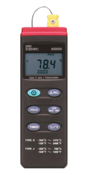

Key Features
✅ Supports both J / K thermocouples for wide compatibility
✅ MAX/MIN/AVG and ΔREL functions for data comparison
✅ Timer mode and auto power off to extend battery life
✅ Rugged handheld design with tripod mount option
✅ Optional RS-232 interface and software for PC logging
✅ Supplied ready to use with probe, battery and case
- Thermocouple Meter
- K Wire Thermocouple ( Low Temperature Range )
- Battery
- Carry Case
- Instruction Manual
Data-Hold Operation: The user may hold the present reading and keep it on the display by pressing the HOLD button. When the hold data is no longer needed, one may release the data hold operation by pressing the HOLD button again. When the meter is under Data Hold operation, the ΔREL, MAX/MIN/AVG, and °C/°F buttons are disabled.
Timer Operation: One may start the timer by pressing the TIMER button. Counting can be stopped or resumed by pressing it again. When the counting exceeds 59 min 59 sec, the time scale will be changed to hours and minutes, and the “H” symbol will appear on the display. The counter can be reset by pressing and holding the TIMER button for 2 seconds.
Relative Operation When one presses the ΔREL button, the meter will memorize the present reading, and the difference between the new reading and the memorized data will be shown on the display. Press the ΔREL button again to exit the Relative operation.
MAX/MIN/AVG Operation: When one presses the MAX/MIN/AVG button, the meter will enter the MAX/MIN mode. Under this mode, the maximum value, minimum value and average value of the latest 4 data is kept in the memory simultaneously and updated with every new data. When the MAX symbol is displayed, the Maximum is shown on the display. Press MAX/MIN/AVG again, then the NIN symbol is on the display and also the minimum reading. Press MAX/MIN/AVG again, the AVG symbol is on the display and also the average reading. Press MAX/MIN/AVG again, MAX, MIN, and AVG will blink together. This means that all this data is updated int the memory and the reading is the present temperature. One may press MAX/MIN/AVG to cycle through the display mode among these options. When the meter is under operation, ΔREL and °C/°F are disabled. To exit the MAX/MIN mode, one may press and hold MAX/MIN/AVG for two seconds.